How to Get the Free Aurora Cape in Minecraft
Watch a Dungeons II stream for 15 minutes on Twitch or 3 on TikTok between Sept 29 and Oct 14, then redeem the code at minecraft.net/redeem. Java and Bedrock.
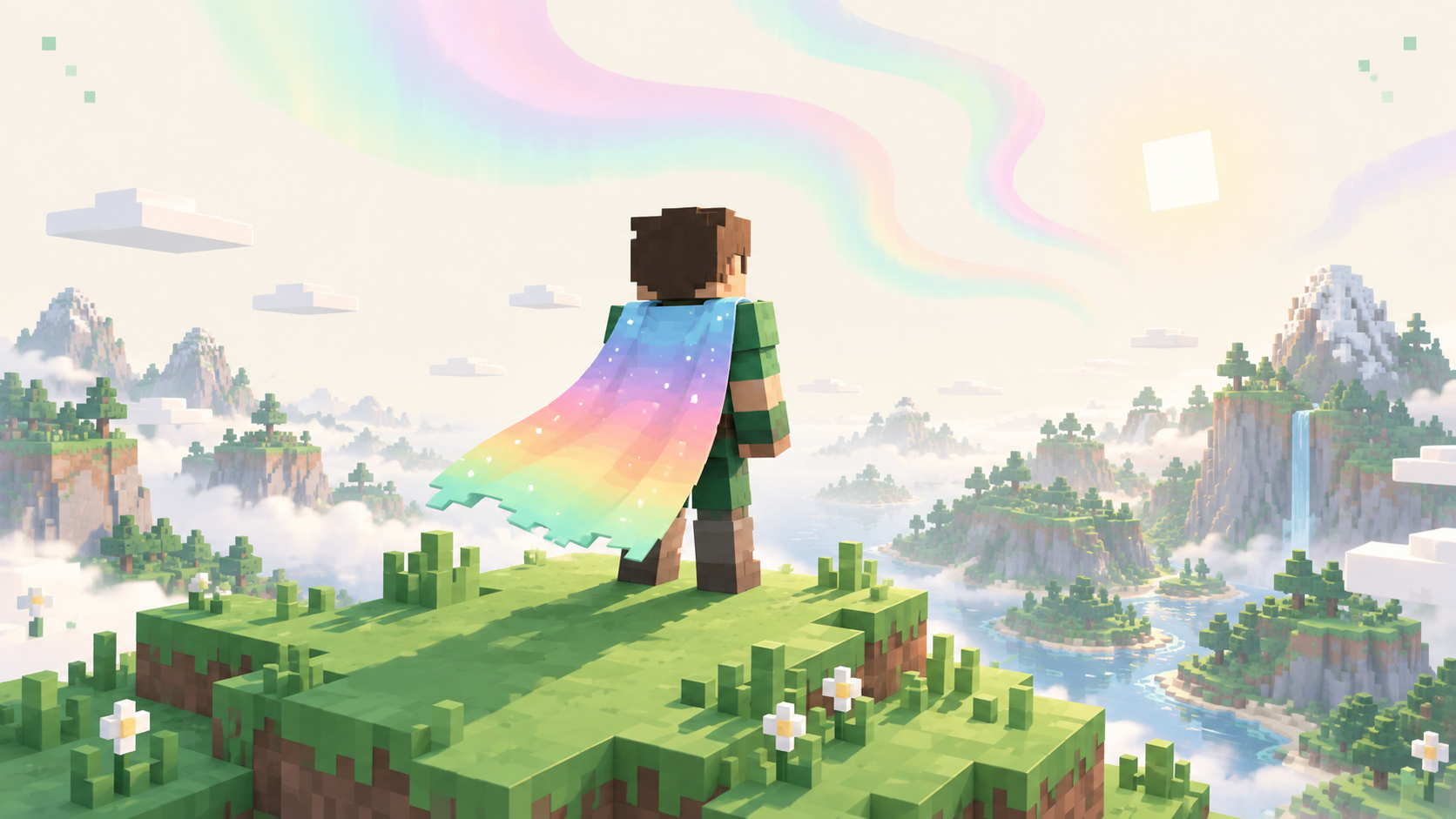
The Aurora Cape is a free cape for Minecraft Java and Bedrock that you earn by watching a Minecraft Dungeons II livestream, either 15 minutes on Twitch or 3 minutes on TikTok. Watching gets you a code, and you redeem that code at minecraft.net/redeem on the Microsoft account you play Minecraft on. The watch window opens on September 29, 2026 at 12:00 AM PT (07:00 UTC) and closes on October 14 at 11:59 PM PT (06:59 UTC on October 15). Streams you watch before it opens don't count, and you don't need to own Dungeons II, only to watch someone play it.
The cape itself is a pastel gradient that runs from light blue at the top through lavender and pink into peach, yellow and a pale green at the bottom, with small white dots scattered over it. There's an elytra version in the same colors with a white outline.
On Twitch
- Sign into Twitch. Drops only track while you're logged in, so watching signed out does nothing.
- Go to the Minecraft Dungeons II category and open a live stream from a Partner or Affiliate channel. The ones that count show a Drops Enabled tag.
- Watch for 15 minutes in total. You can switch channels partway through, as long as each one is an eligible stream in that category.
- Click your profile picture, open Drops & Rewards, and find the Aurora Cape reward. Twitch doesn't claim it for you, so click Claim and copy the code it gives you. The code also shows up in your Twitch notifications.
The Drops & Rewards page shows a progress bar for the cape while you watch, which is the easiest way to confirm a stream is actually counting.
On TikTok
- Open TikTok and sign in.
- Find a live stream playing Minecraft Dungeons II that has Game Rewards enabled.
- Watch it for 3 minutes.
- The code arrives as a TikTok notification. Copy it from there.
If you already use TikTok this is the quicker route. Neither Twitch Drops nor TikTok's Game Rewards run in every country, though, so if one platform doesn't show the campaign where you live, try the other.
Redeem the code
- Go to minecraft.net/redeem and sign in with the Microsoft account you play Minecraft on.
- Paste the code and click Redeem.
- Open Minecraft. The cape is tied to your account rather than to one edition, so it appears in your cape list on Java and Bedrock.
The code isn't linked to your Twitch or TikTok account. It goes to whichever Microsoft account is signed in on the redeem page, so if you have more than one, or you're getting the cape for a kid who plays on their own account, check which one you're on before you click Redeem.
Watch time stops counting on October 14, but don't leave it until the last few days. Twitch code drops for Minecraft have been listed as "while supplies last", so the codes can run out before the end date. Once you have a code, redeem it that day rather than leaving it sitting in your inventory or notifications.
How to equip it
Java: open the Minecraft Launcher and go to the Skins tab. Hover over your skin, click the three dots and pick Edit, then select the Aurora Cape and save. If you can't see it on yourself in third person, check Options → Skin Customization in game and make sure Cape is on.
Bedrock: from the main menu, open the Dressing Room, go to the capes section and equip the Aurora Cape.
Other players will see it on any online-mode Java server, which is what most public servers in our server list run. Offline-mode servers don't load capes from Mojang, so there you'll usually show up without one.
If it doesn't show up
If you watched on Twitch and never got a code, open Drops & Rewards and look at the cape. If it's at 100%, you just haven't clicked Claim yet. If it's stuck at zero, you either weren't logged in or the stream wasn't eligible, meaning it had no Drops Enabled tag or wasn't in the Dungeons II category. If the reward says it's no longer available, Twitch has probably run out of codes, so try TikTok instead. On TikTok, check that the stream actually had Game Rewards enabled, because a regular Dungeons II stream without it doesn't count.
If you redeemed the code and the cape still isn't in your list, you almost certainly redeemed it on a different Microsoft account from the one Minecraft uses. Compare the account on minecraft.net with the one in the launcher or on your Bedrock profile. If they match, sign out of the launcher and back in, or fully close and reopen Bedrock, so it pulls your cape list again.
One more mix-up to rule out: the Corrupted Creeper Cape from the September 21–26 watch campaign was also earned by watching streams, but that one is a Dungeons II cape and only shows up inside Dungeons II. The Aurora Cape is the one for Minecraft itself. The Dungeons II capes that do carry over into Minecraft, the Twisted Cape and the Hero Cape, unlock through the game instead, and we cover those in how to get the Twisted Cape and Hero Cape.